Word-by-Word Captions in Adobe Premiere Pro
Caption Plug transcribes sequence audio with word-level timestamps, then renders active-word animation directly onto the Adobe Premiere Pro timeline.
Adobe Premiere Pro 2020 (v14) or newer · Windows and macOS · 14-day refund policy
Sentence timing is not word timing
Premiere's native captions are excellent for editable subtitles, but a sentence-level caption does not know which word is being spoken inside the sentence. That is why manual karaoke highlights become a wall of keyframes.
Caption Plug keeps every Whisper word and timestamp. The render engine samples that timing at the sequence frame rate, so the spoken word can change colour, scale, fill, underline, or move without hand animation.
From sequence audio to finished captions
- 01
Select dialogue
Select the dialogue clips you want captioned, or leave nothing selected to use the whole sequence.
- 02
Transcribe locally
The bundled Whisper model returns each word with a start and end time. Optional cloud providers remain available.
- 03
Choose the motion
Pick a preset, font, colour, words per caption, and position while the actual render engine previews the result.
- 04
Place it on the timeline
Caption Plug renders at the sequence resolution and frame rate, then places the output on a fresh video track.
The Premiere panel and the output it controls
The panel preview uses the same caption engine as generated timeline media. The screenshot below is a real v1.1.3 panel capture; the current public version is v1.5.2.
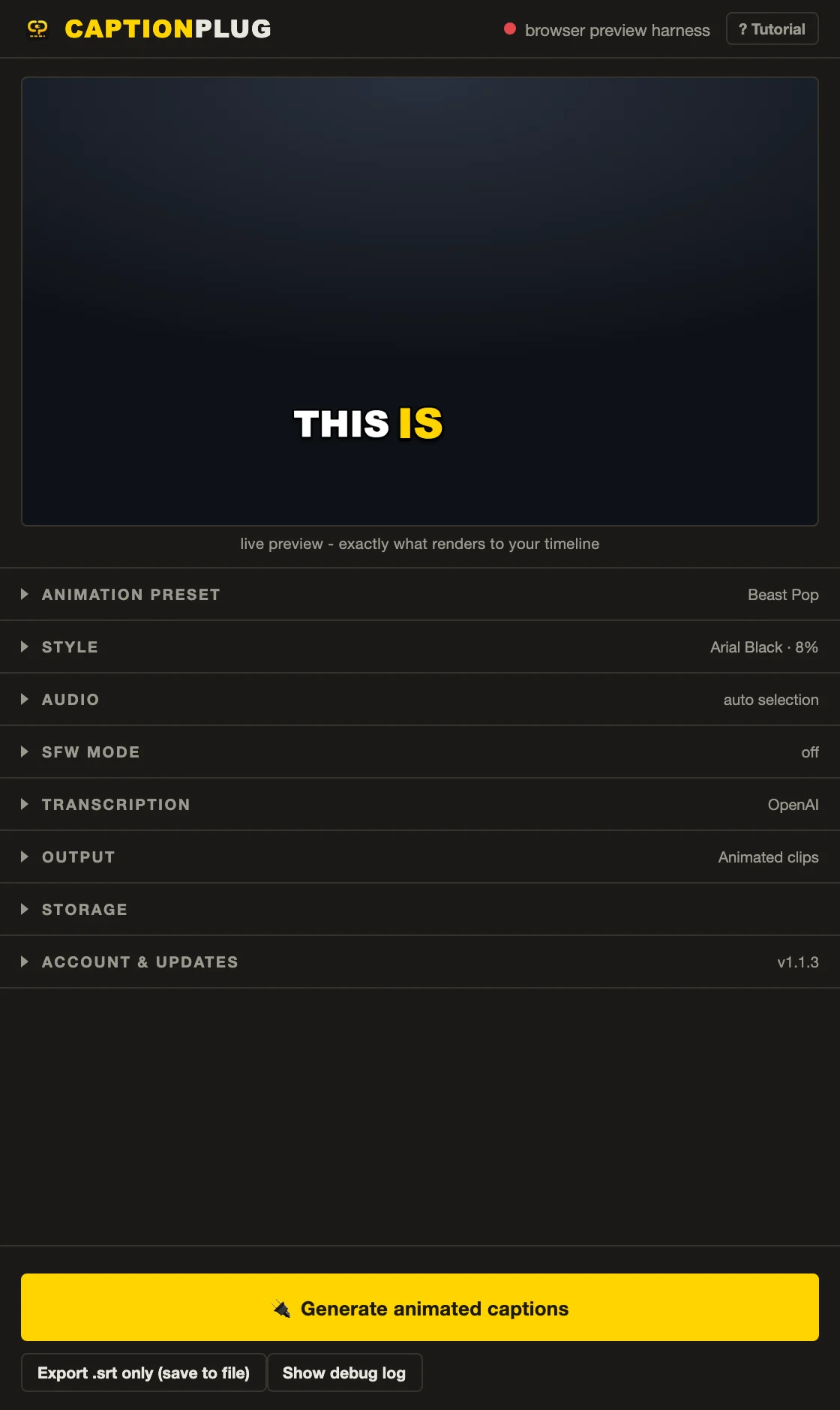
A highlight that follows speech, frame by frame
Animated mode creates transparent, frame-accurate media clips. For revisions that matter more than per-word motion, switch to Editable text and generate a native Premiere caption track instead.
- Adobe Premiere Pro 2020 (v14) or newer
- Windows and macOS
- Horizontal, square, and vertical sequences
- Local Whisper plus optional OpenAI or Groq transcription
- Transcription can miss names, accents, or speech under loud music, so review the transcript before export.
- Per-word animation is available in Animated clips mode. Premiere's native caption tracks do not expose the same animation control.
- Rendered output uses project-adjacent media and should be kept with the Premiere project when archiving.
Frequently asked questions
How does Caption Plug time captions word by word?
The transcription result includes a start and end time for each word. Caption Plug groups those words for readability, then samples the active-word state on every sequence frame.
Are word-by-word captions editable in Premiere Pro?
Animated clips are rendered media, so text changes are made in the cached transcript and regenerated. Caption Plug can also create a native editable caption track, but that mode does not include the same per-word animation.
Can word-by-word captions use local transcription?
Yes. The bundled multilingual Whisper model runs on your computer after its one-time download. OpenAI and Groq remain optional providers.
How many words should appear in each caption?
Start with two to four words for most short-form edits. Use one word for maximum punch, or longer groups for calmer interviews. Always check line breaks and safe-zone placement in the final sequence.
Pay once. Use it without limits.
45 animated caption presets, 8 title presets, 62 fonts, local Whisper, and every v1.x update are included for $14.99.