Skip to content

windows and macos installers

Download Caption Plug for Adobe Premiere Pro.

Current public build: v1.1.3, released 2026-07-28. Licensed downloads live in your account and use short-lived links.

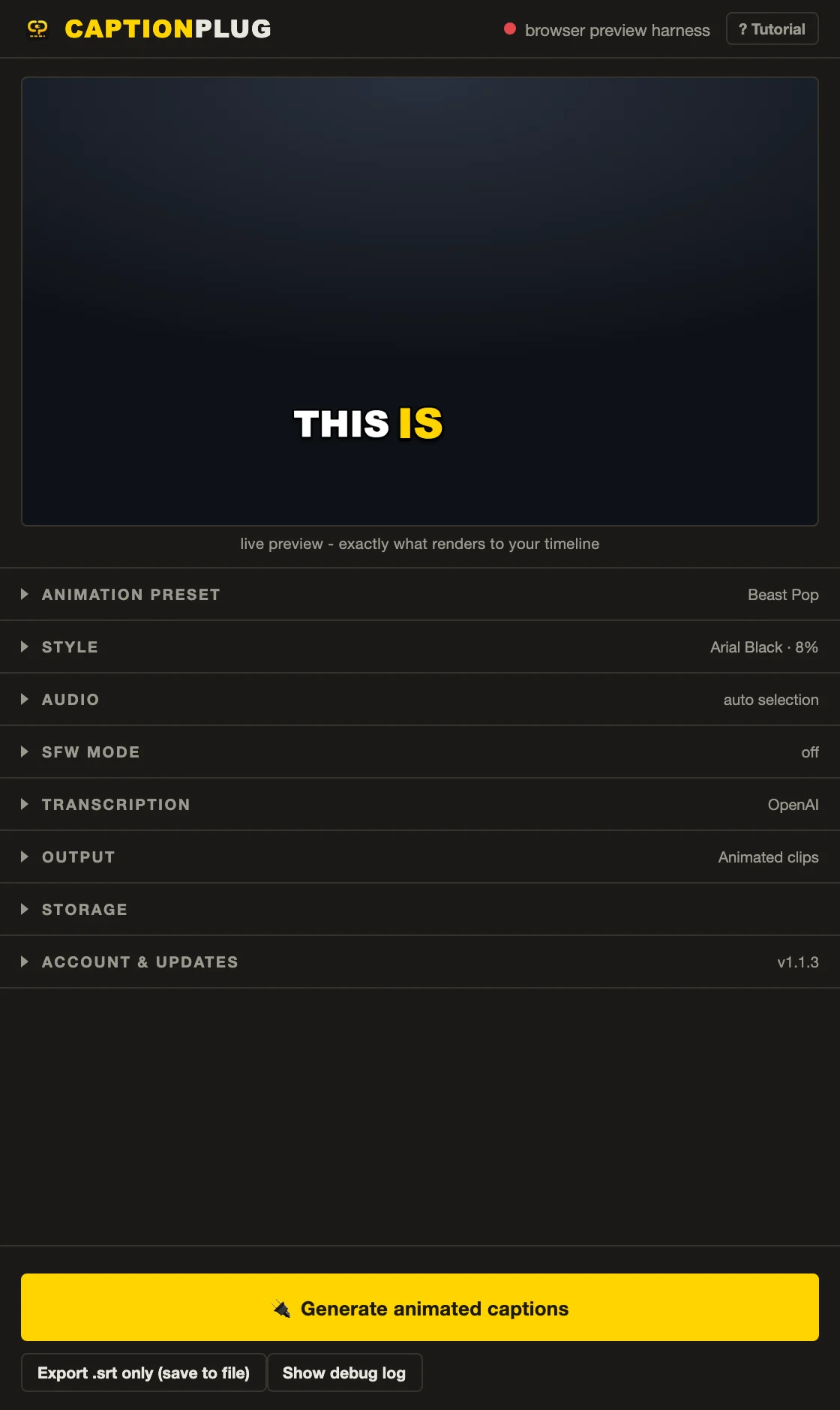
Caption Plug version 1.1.3 panel showing the live caption preview, animation, style, audio, SFW, transcription, output, storage, and update controls
Caption Plug v1.1.3 browser test-harness capture from product source revision ef8721194a05. Premiere-only host calls are intentionally unavailable in this capture.

the installed panel

One place for preview, transcription, output, and updates

The public installer opens this panel inside Premiere. Its live preview uses the same caption renderer as timeline output, while each accordion exposes the settings that affect the next generation run.

  • Animation and style: choose the motion system, font, words per caption, position, colours, stroke, and shadow.
  • Audio and transcription: read the active timeline selection, then use bundled local Whisper or an optional provider.
  • Output: create deterministic animated clips, editable native captions, or an SRT file.
  • Account and updates: sign in, manage activations, and install eligible v1.x releases.

Windows download path

Install on Windows

CaptionPlug-Setup-1.1.3.exe

  1. 1Quit Adobe Premiere Pro.
  2. 2Sign in to the Caption Plug account that owns the licence.
  3. 3Download the Windows installer and run it for your user account.
  4. 4Reopen Premiere, then choose Window > Extensions > Caption Plug.
Open account downloads

macOS download path

Install on macOS

CaptionPlug-v1.1.3.pkg

  1. 1Quit Adobe Premiere Pro.
  2. 2Sign in to the Caption Plug account that owns the licence.
  3. 3Download the macOS package and complete the installer.
  4. 4Reopen Premiere, then choose Window > Extensions > Caption Plug.
Open account downloads

compatibility

Check the edit bay before installing

Premiere Pro
2020 (v14) or newer
Operating systems
Windows and macOS
Licence
3 machines owned or controlled by the purchaser
Transcription
Bundled local Whisper model; optional OpenAI and Groq integrations
Updates
All v1.x updates included; install from the panel when available

security and signing

Private files, time-limited links

Installers are stored privately. A signed download URL is issued only after the account, purchase, and active licence are verified, and expires after five minutes.

A signed download URL controls file access. It is not a claim about Apple notarization or Windows publisher reputation. Follow the setup guide if an operating-system warning appears.

updating

Update inside the panel

When a newer build is published, Caption Plug shows an Update button in its header. Users still on v1.0 should install a current package once before using in-panel updates.

Read the complete version history

download troubleshooting

If the panel does not appear

Quit Premiere completely, rerun the installer, and reopen the application. On macOS, the preference cache may also need to reload. The public setup guide covers missing extensions, activation limits, local Whisper, and manual fallback installation.